


Feature-rich responsive slider plugin for Sylius 2 with translatable image and video slides, live admin previews, Symfony UX rendering, Twig Hooks, and optional CMS integrations.
A Sylius 2.x plugin for building and managing rich storefront sliders and banners: a two-column admin workspace with a live preview, per-breakpoint media and layout, per-locale overrides, one-click style presets, content animations and video slides (self-hosted or YouTube) — rendered on the storefront through Symfony UX (Stimulus + Twig Components) and Twig Hooks.




Feature tour
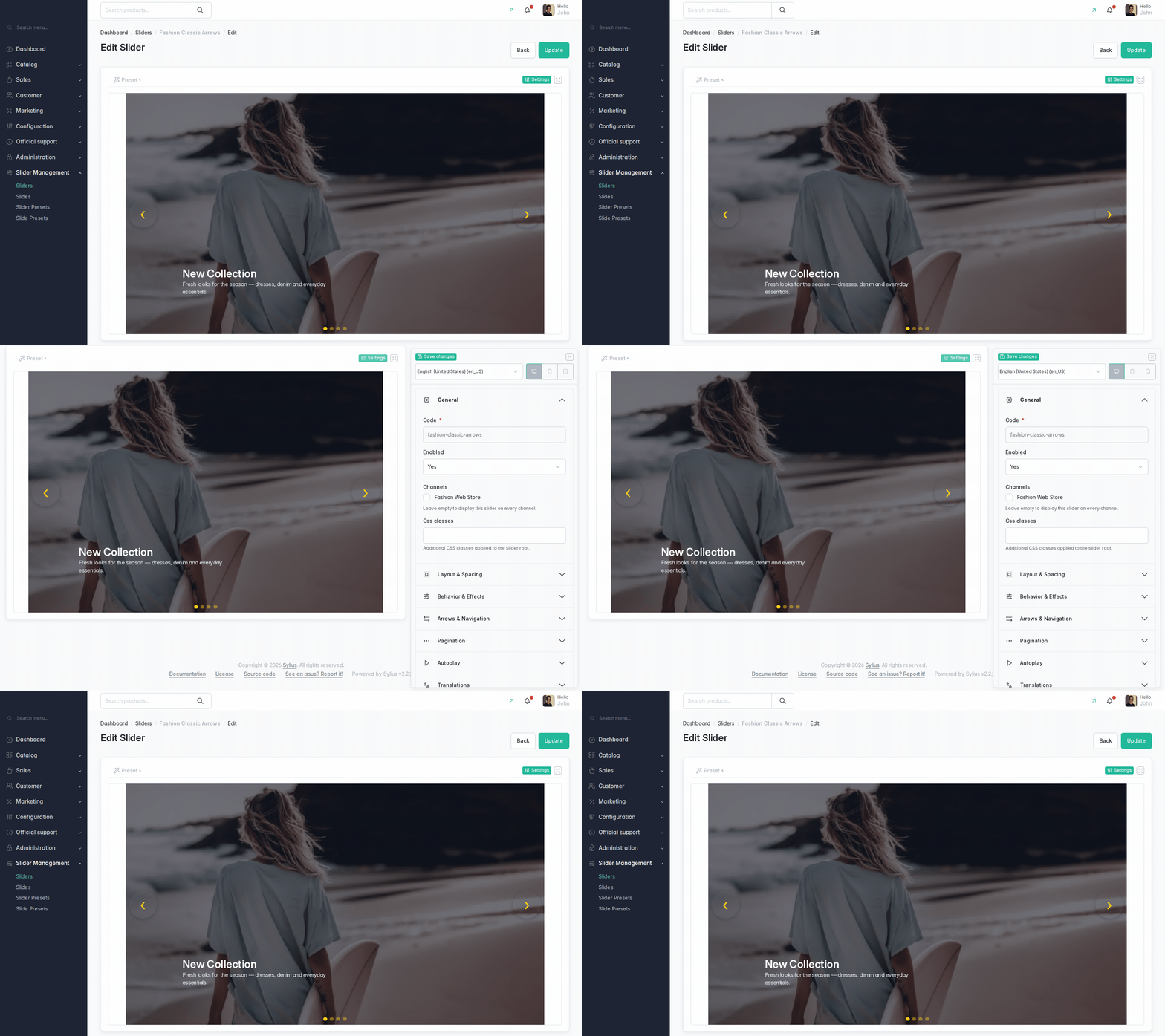
Editing workspace — live preview with the settings drawer (toolbar-driven breakpoints and languages, live draft refresh):
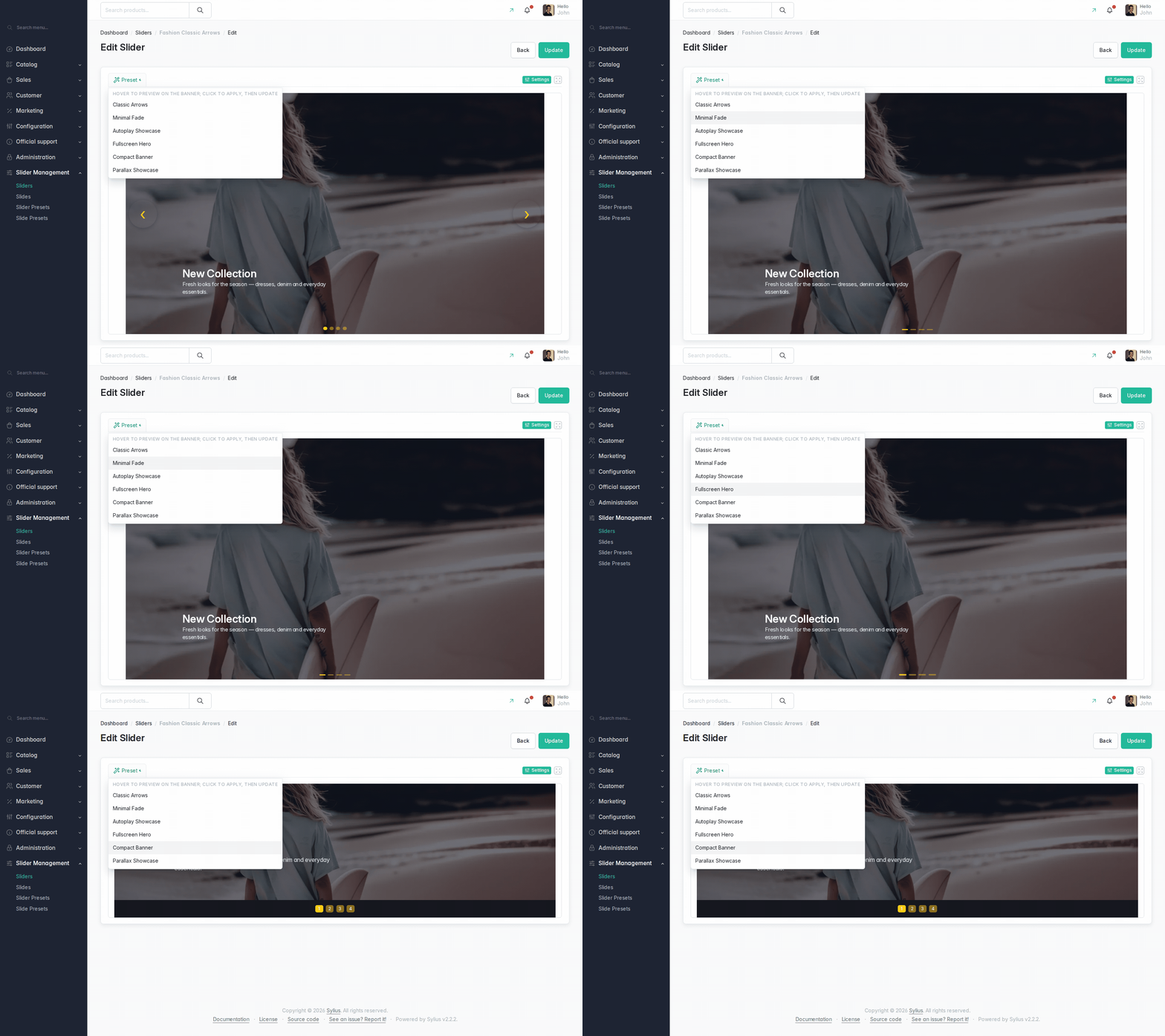
Style preset try-on — hovering a preset in the toolbar previews it on the actual banner, click applies it:
Storefront slider, and the same slide re-laid-out per breakpoint:


What it does
youtube-nocookie player); the provider layer is extensible.vanssa-slider Stimulus controller; every admin-configured value is exposed as a CSS custom property or data attribute for theming.Full option-by-option reference: docs/usage/options-reference.md.
Requirements
| Dependency | Version |
|---|---|
| PHP | >= 8.3 |
| Sylius | ^2.1 |
| Symfony | ^7.4 |
symfony/ux-turbo |
^2.22 |
| Node.js | >= 20 (Yarn Classic v1) |
The frontend requires an Encore + @symfony/stimulus-bridge build
(the Sylius-Standard default). AssetMapper is not supported — the plugin ships no importmap entries.
composer.json temporarily pins
api-platform/metadata,
api-platform/symfony,
api-platform/doctrine-common and
api-platform/doctrine-orm
below 4.3 via a
conflict block: a fresh install resolving api-platform
4.3.x breaks
cache:warmup in Sylius's ApiBundle routing.
Keep those sub-packages below 4.3 in your project until the pin is lifted.
Install
1. Register the recipe endpoint
The plugin ships its own Flex recipe endpoint,
which lets composer require
auto-register the bundle, its config import, its routes and its Stimulus controller manifests.
composer config --json extra.symfony.endpoint
replaces the whole array, though: a stock Sylius-Standard project already lists Sylius's own
recipes endpoint there, and a naive two-entry command silently drops it, after which Sylius's own recipes stop
resolving.
Option A — with the composer config command:
composer config --json extra.symfony.endpoint '["https://api.github.com/repos/Sylius/SyliusRecipes/contents/index.json?ref=flex/main","https://raw.githubusercontent.com/vanssata/sylius-slider-plugin/2.3/flex/index.json","flex://defaults"]'
The first entry is Sylius's own recipes endpoint — keep it, since a plain Sylius-Standard project already
ships it and this command has to restate the whole array. flex://defaults
stays last: Flex tries each endpoint in order and falls back to it.
Option B — editing composer.json by hand, for projects that prefer it, or whose extra.symfony block already carries other keys:
{
    "extra": {
        "symfony": {
            "endpoint": [
                "https://api.github.com/repos/Sylius/SyliusRecipes/contents/index.json?ref=flex/main",
                "https://raw.githubusercontent.com/vanssata/sylius-slider-plugin/2.3/flex/index.json",
                "flex://defaults"
            ]
        }
    }
}
The plugin's entry goes before flex://defaults
— order is significant, since Flex resolves endpoints in order and stops at the first match. This is
equivalent to Option A.
2. Install the package
composer require vanssa/sylius-slider-plugin -W
bin/console doctrine:migrations:migrate -n
yarn install --force && yarn build && bin/console assets:install
-W
is needed because a current sylius/sylius-standard
locks api-platform
at 4.3.x,
which this plugin's conflict
block forbids; the flag lets the resolver move those transitive packages down.
--force
matters on the first install too: Yarn Classic copies
file:
dependencies instead of symlinking them, so a plain install can leave a stale copy in place.
The Flex recipe registers the bundle, imports the config, mounts the admin and shop routes, and patches the
storefront pair into your
assets/shop/controllers.json
and the full 14-controller set into your
assets/admin/controllers.json.
Separately, core Flex's
PackageJsonSynchronizer
seeds your root
assets/controllers.json
with all 14 controllers but only the storefront pair active — the per-context files above take precedence
in both builds, so a storefront bundle no longer compiles the 12 admin controllers or the Pickr stylesheet.
Manual wiring, the frontend contract and the optional Twig Hooks homepage integration are in
docs/usage/getting-started.md;
docs/FLEX_RECIPE.md
explains what the endpoint resolves and writes.
3. Load the demo fixtures (optional)
Optional — meant for trying the plugin out or developing against it, not for loading on a production shop:
bin/console sylius:fixtures:load vanssa_sylius_slider_demo -n
sylius:fixtures:load
takes the suite name as a positional argument — there is no
--suite
option, and passing one aborts the command. The suite
(vanssa_sylius_slider_demo,
defined in config/fixtures.yaml)
creates six demo sliders, one per shipped style preset, with bundled photos and a video clip. The full table of
what it seeds is in
docs/usage/getting-started.md.
Optional: homepage placement via Twig Hooks
The plugin ships config/twig_hooks/shop.yaml
with an empty hook map — it registers no storefront hookables of its own, so placement is
your own project's configuration. Putting the fixture suite's
fashion-classic-arrows
slider on the homepage — the two steps chain together — looks like this:
# config/packages/vanssa_sylius_slider.yaml
sylius_twig_hooks:
    hooks:
        'sylius_shop.homepage.index':
            banner:
                enabled: false
            vanssa_sylius_slider_homepage:
                component: 'vanssa_sylius_slider:shop:homepage_slider'
                props:
                    code: 'fashion-classic-arrows'
                priority: 400
sylius_shop.homepage.index
is Sylius core's hookable; its own hookables are
banner
(priority 300),
latest_deals
(200),
new_collection
(100) and
latest_products
(0), so a priority above 300 puts the slider at the top. Disabling
banner
is optional — without it you get both. The
homepage_slider
component applies the channel restriction and renders nothing when no enabled slider matches the code and channel
— no error, no placeholder — which is the first thing to check if nothing appears. Other placements
(a single slide, a CMS block, the direct routes) are in
docs/usage/storefront.md.
Documentation
Using the plugin
- Getting started — install, first slider, demo fixtures
- Admin guide — the editing workspace, section by section
- Style presets — gallery, try-on, admin-managed vs config
- Storefront — routes, hooks, breakpoints, video slides
- Options reference — every option, value and default
Extending the plugin
- Architecture — layers and where things live
- Adding a Stimulus controller — the four manifests and the Flex recipe
- Extending — templates, services, form fields, providers
- Style presets — defining presets in config
- Color picker type — the reusable RGBA field
- Testing — PHPUnit, Behat, Playwright and when to use which
- Docs media — regenerating the screenshots and GIFs
- Contributing — local setup and release flow
- Flex recipe — how the recipe endpoint works
Upgrading
composer update vanssa/sylius-slider-plugin
composer recipes:update vanssa/sylius-slider-plugin
bin/console doctrine:migrations:migrate -n
yarn install --force && yarn build && bin/console assets:install
composer recipes:update
re-applies the Flex recipe's patches — it is what picks up a changed recipe
ref,
such as the controller-manifest split added in 2.3.2; a plain update does not re-run recipes at all.
Yarn Classic copies file:
dependencies instead of symlinking them, so
yarn install --force
is not optional after an upgrade. Check
CHANGELOG.md
for new config keys, migrations or controller manifest changes, and
UPGRADE.md
for the 2.3.2 controller-split migration specifically.
License
MIT — see LICENSE. The Sylius trademark and logo are covered by LICENSE_OF_TRADEMARK_AND_LOGO.
Reviews
No reviews yet. Be the first to review this product!


© 2026 Sylius. All rights reserved.